Master Your Resin 3D Printer from Anywhere with Resin Control
Transform your iOS device into a powerful command center for your resin 3D printer. Monitor, manage, and print with unmatched precision. 📱⚙️
See Resin Control in Action
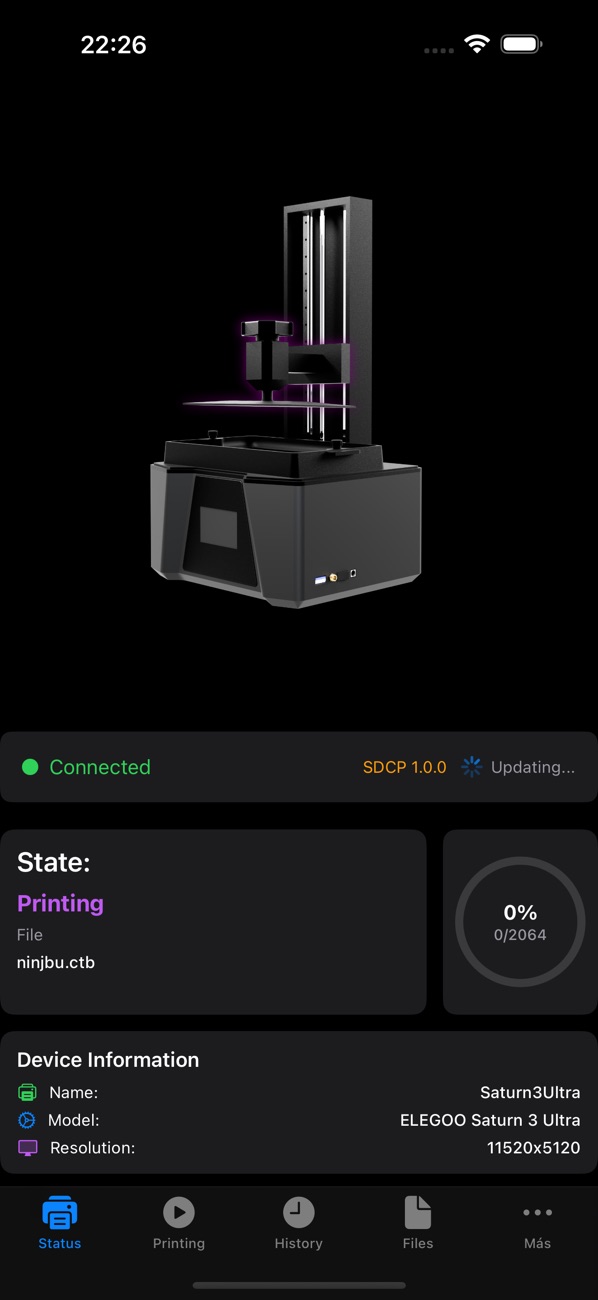
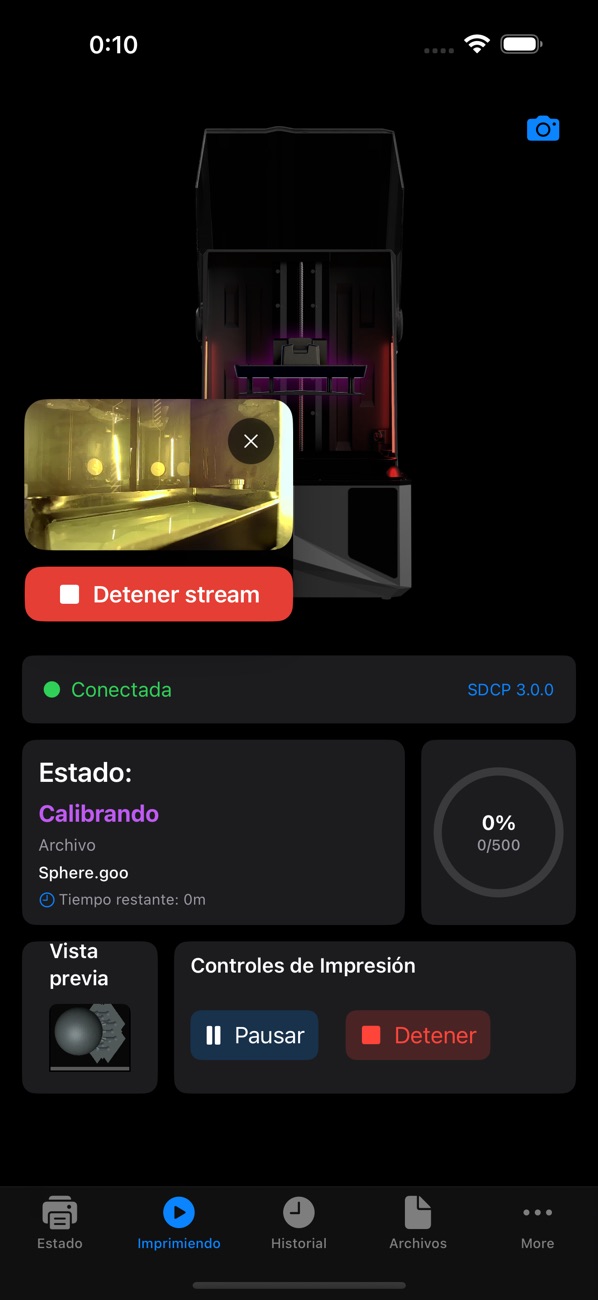
Browse screenshots that showcase the clean interface and powerful functionality of Resin Control on your iOS device.
iPhone & iPad




Why Choose Resin Control?
Experience the next level of 3D resin printing with features designed for ultimate convenience and control.
Total Remote Control
Start, pause, resume, or stop your prints from anywhere within your local network, giving you freedom and flexibility.
Real-time Monitoring
Keep a close eye on print progress, status, and even a live camera feed to ensure everything is running smoothly.
Effortless File Management
Wirelessly transfer .ctb and .goo files directly to your printer, simplifying your workflow and saving time.
Smart Inventory Tracking
Manage your resin stock efficiently within the app, helping you stay organized and never run out mid-project.
Multi-Printer Ready
Connect and manage multiple SDCP-compatible resin printers from a single, intuitive interface on your iOS device.
Powerful Features for Precision Printing
Resin Control is packed with essential tools to streamline your 3D printing workflow and ensure consistent, high-quality results.
Comprehensive Printer Management
Gain unparalleled control over your 3D resin printers with intuitive commands and real-time feedback.
Real-time Status Monitoring
View your printer's current status, remaining print time, and progress updates instantly.
Remote Print Control
Start, pause, resume, or stop any print job directly from your iPhone or iPad with a tap.
Instant Printer Discovery
Automatically detect and connect to compatible printers on your local network for quick setup.
Multi-Printer Support
Effortlessly switch between and manage multiple SDCP-compatible resin printers from one app.
Enhanced Workflow & Visual Monitoring
Optimize your printing process with smart file handling and live visual feedback.
Wireless File Transfer
Send .ctb and .goo print files to your printer wirelessly, eliminating the need for USB drives.
Live Camera Feed & Snapshots
Watch your print in real-time or capture snapshots directly from your printer's integrated camera.
Detailed Print History
Review past print jobs, including status and duration, to keep track of your production.
Resin Inventory Tracking
Log and monitor your resin stock, ensuring you always have enough material for your next project.
Intuitive User Experience
Designed for ease of use, Resin Control makes managing your 3D printer a smooth and enjoyable process.
Redesigned UI
Enjoy a fresh, modern interface with improved visual consistency and better readability.
iPad Optimization
Benefit from a dedicated iPad interface, making the most of larger screens for comprehensive oversight.
Customizable Notifications
Receive alerts for print completion, errors, or low resin levels to stay informed.
What Our Users Say
Hear from 3D printing enthusiasts who trust Resin Control for their projects.
Resin Control has transformed my workflow. Being able to monitor my prints and transfer files wirelessly from my iPad is a game-changer. It's stable and incredibly user-friendly.
I love the live camera feed feature! It gives me peace of mind knowing I can check on my prints even when I'm not in the workshop. The multi-printer support is fantastic too.
Finally, an app that lets me truly control my resin printer without constantly juggling USB sticks. The new UI update is a huge improvement, making it even easier to navigate.
The resin inventory tracking is surprisingly useful. I never knew I needed it until I had it, and now I can't imagine printing without it. Keeps me super organized.
Download Resin Control Today
Take command of your 3D resin printing. Get Resin Control now and elevate your printing experience on iPhone and iPad.
Frequently Asked Questions
Find quick answers to common questions about Resin Control, its features, and compatibility.
Resin Control is compatible with 3D resin printers that support the SDCP (Smart Device Control Protocol) protocol, including many popular models like the Elegoo Saturn 3 Ultra and Mars 4 Ultra. We continuously add support for new printers and firmware versions.
Yes, Resin Control offers multi-printer support, allowing you to easily connect, monitor, and manage several SDCP-compatible resin printers from a single, intuitive interface on your iOS device.
No, Resin Control is a one-time purchase of $4.99 USD. There are no recurring subscription fees to access its core features. Updates that include new printer support and enhancements are provided regularly.
You can wirelessly transfer .ctb and .goo files to your connected printer over your local Wi-Fi network. Simply select the file from your device, and Resin Control will securely send it to your printer, ready for printing.
Resin Control features enhanced automatic printer detection. If your printer isn't discovered, ensure both your iOS device and printer are on the same local Wi-Fi network. You can also manually add printers using their IP address.